Communicate professionally and effectively
Slack positions itself as a “work operating system” for professional teams, bringing together chats, calls, files, workflows, and apps into one unified workspace. Users can create a workspace, set up channels (public or private) for topics or teams, send direct messages, and integrate third‑party tools such as Google Drive, GitHub, Trello, Zapier, and more.
Top Recommended Alternative

Slack’s appeal is immediate. Instead of scattered emails or disparate group chats, you get an organized platform where conversations, files, and history live together and are searchable. For everyday collaboration, especially remote or distributed teams, this message hub has become a go‑to for bridging communication gaps.
Picking up the Slack
Slack’s tagline is ‘be less busy’, which really does happen if you use it properly. Sure, you may lose some time while you get the whole team to learn the app and figure out the best way to use it, but overall it will save time and make everyone more productive. Put simply, this is a messaging app, but it’s tailored to conquer the terrible communication problems suffered by most modern offices.
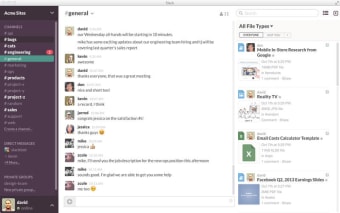
The system revolves around channels, which are marked with hashtags. Each channel is given a title, such as #Marketing or #Accounts. When you want to send a message to the Marketing team, you just click on the appropriate channel. When you want to contact a specific person or have a sensitive message, you can direct message or DM that user. You can easily transfer files, for example, just by dropping them in.
Streamlined and simple
Slack’s interface emphasizes readability, with a left sidebar listing channels and direct messages, a main pane for conversation, and tools or integrations readily accessible. Users described it as simple, modern, and cleaner than some other collaboration apps. Users can customize their sidebar, move channels into custom sections, switch themes (light/dark), and use keyboard shortcuts to streamline workflows. Threads keep side‑conversations linked and organized rather than lost in the ether.
This communication hub continues to evolve with timely updates such as nested workflow branches for more complex process automation, new message summarization, integration of Dropbox, and an improved formatting toolbar with an underline option. It also introduced “Channel Expert” as an AI‑powered agent in channels to answer questions and provide help when configured by admins. These enhancements demonstrate Slack’s push into automation, AI, and enterprise‑grade control. Still, the app remains slow on older devices.
A centralized hub for team productivity
Slack successfully consolidates workplace communication, combining messaging, file sharing, and integrations into a single, intuitive platform. Its channel-based system, threaded conversations, and AI-powered features streamline collaboration, particularly for remote or distributed teams. Regular updates and workflow enhancements keep the app modern and efficient. While performance may lag on older devices and a learning curve exists, Slack remains a powerful tool for improving team organization and productivity.